User Guide — AURA
This guide is for anyone who has just created an account and wonders where to start. It describes what the platform does today, in the order you use it.
What AURA does, and what it doesn't
AURA gathers evidence of your AI systems' compliance with Regulation (EU) 2024/1689, organises it into a verifiable file, and measures what can be measured — a model's bias, the carbon footprint of a training run.
AURA is not a notified body. The reports it produces constitute neither a conformity assessment within the meaning of Article 43 of the Regulation, nor a certification, nor legal advice.
This sentence isn't a lawyer's caveat. It describes exactly where the line sits: the platform helps you build a file and know where you stand. It's an accredited auditor who certifies, and only them.
Three distinctions you'll find throughout the interface, because they change the meaning of what you're reading:
| Measured, estimated, declared | every piece of evidence carries its nature. A declaration doesn't carry the weight of a measurement, and the report never confuses the two |
| Not assessed ≠ not satisfied | a control that hasn't been looked at is not a failed control |
| Empty ≠ zero | an unavailable metric stays empty. Zero would mean "no emissions", or "no bias" |
The free trial
It starts as soon as your organisation is created, with nothing to ask for.
What it includes
The Assistant, free for 10 days. It answers questions about the regulations (AI Act, GDPR, NIS2) as well as about AURA itself — how to start an audit, what a score or a technical test means — relying only on its two indexed libraries. It cites its sources, and when it can't find an answer, it says so rather than inventing one.
One free audit, your choice. Bias or legal, once. The choice is yours: the axis you run consumes the trial, the other stays available once you configure a key.
What happens next
Once the 10 days are up, or the audit consumed, the platform tells you the trial has ended. Nothing is deleted: your projects, files and reports remain accessible. It's the call to a language model that stops.
You can see where you stand at any time under Settings → LLM Providers. The banner disappears on its own as soon as you've configured your own key: it only announces what's still being offered to you.
The Assistant
An intent router classifies each question — legal (the regulation, its articles, its obligations) or platform (AURA itself: its screens, how to start an audit, what a methodology it implements means — a WEAT/SEAT or BBQ/HELM test, the AIRS engine, measured/estimated/declared evidence). When in doubt, the Assistant falls back to legal mode — the stricter one.
Each answer shows where it comes from (Legal or Platform), and remains based solely on the excerpts found in the matching library: never an answer generated without a supporting document, whatever the mode.
The answer comes condensed first, with a follow-up offer to go deeper into a specific point rather than listing every special case up front.
The path of an audit
1. A project
AI systems → New project. A project represents an AI system. You'll have as many as you have systems to document.
2. A run
A run is a dated campaign on this system: a snapshot of a state, at a given moment. You'll launch several over time, and that's by design — a compliance file is compared from one version to the next.
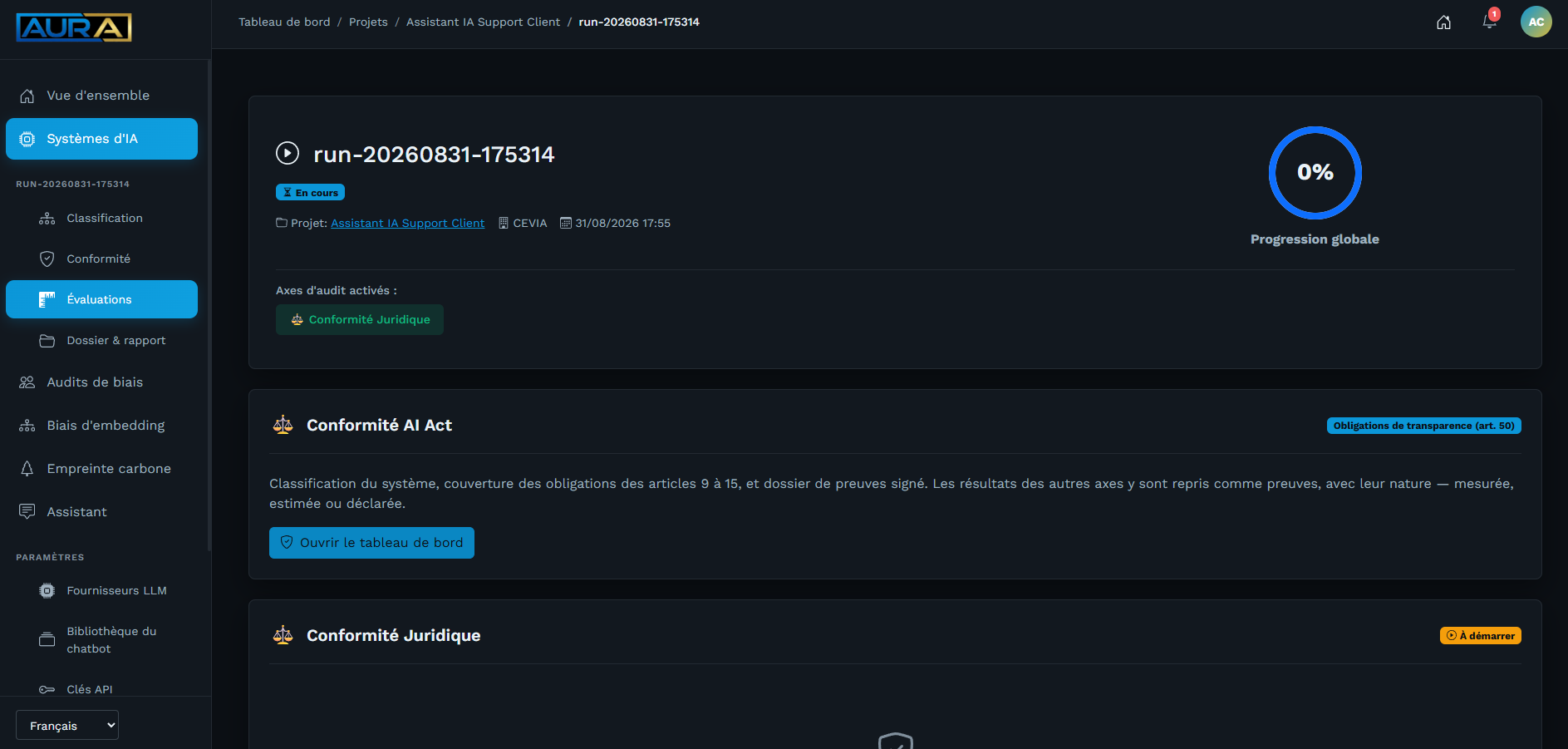
Once the run is open, the sidebar shows its tabs: Classification, Compliance, Assessments, and — as soon as a campaign is open — Evidence file & report. The Assessments tab is the overview: it shows side by side the two cards that each open an audit — AI Act compliance (the AIRS framework, step 5) and Legal compliance (the declarative questionnaire, step 4).
3. Risk classification
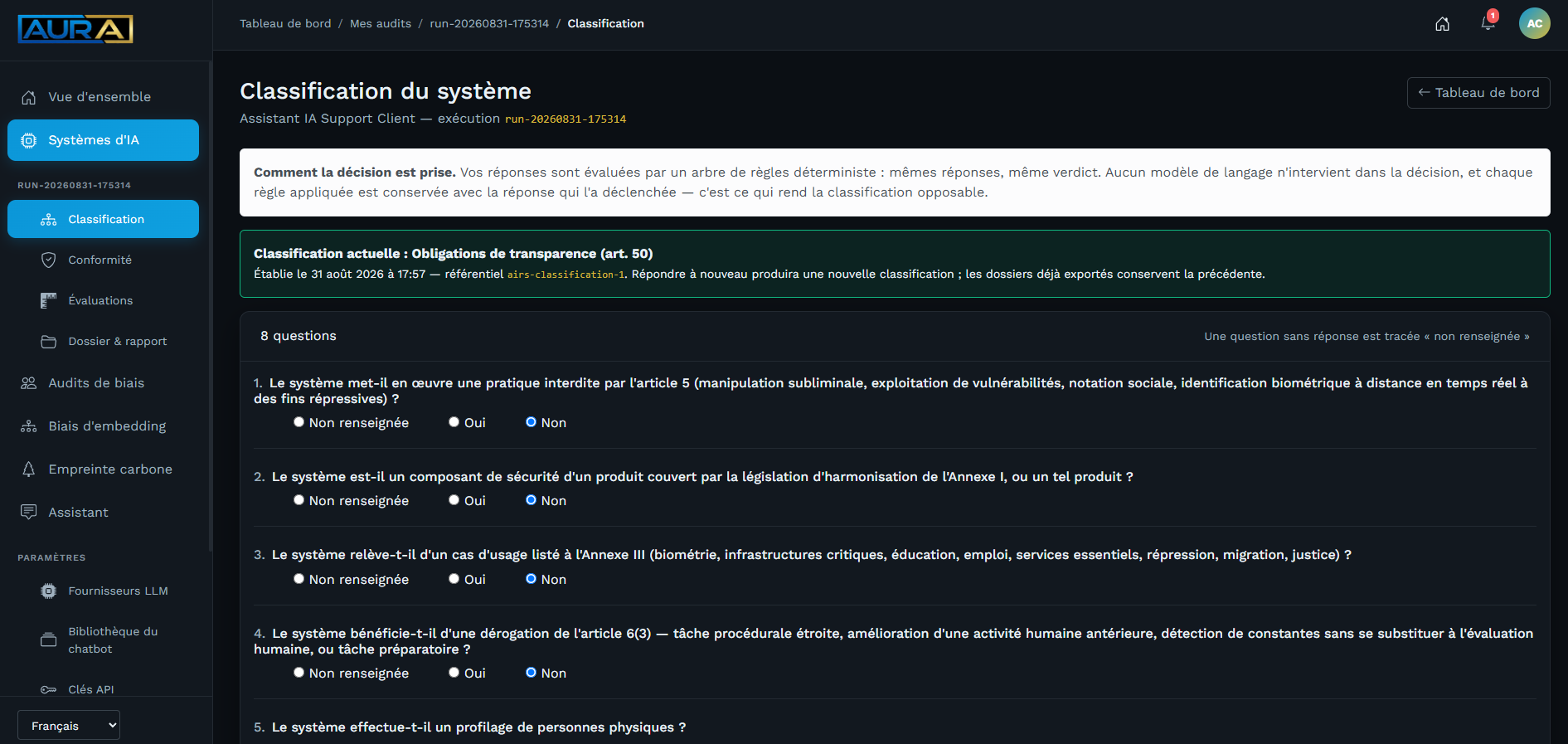
The Regulation doesn't ask the same of every system. Eight questions, assessed by a deterministic rule tree — never a language model — determine your category: prohibited practice, high risk (Annex I or III), general-purpose model with systemic risk, transparency obligations (Art. 50), or minimal risk.
The decision trail is kept. Each answer triggers an identified rule; the report shows which one was decisive, and on which answer — so you can explain the classification, not just announce it.
Classification tab. Answering the questions again, once you've already done so, produces a new classification (Reclassify button from the Compliance tab, once a first classification exists); files already exported keep the old one — the classification a delivered report was based on never changes retroactively under it.
4. The questionnaire
A declarative questionnaire attached to the run: your declarations about your documentation, your governance, your data, under the AI Act and the GDPR. It produces a declarative score, and that word matters: it rests on what you declare, without verification. It flags points of attention; it does not conclude compliance.
Assessments tab → "Legal compliance" card → Start the legal audit. Your answers don't stay isolated: as soon as a Core AIRS campaign opens (next section), they're picked up there as declared evidence — that's exactly what "Core AIRS checks on the record" means in practice.
5. The control campaign
This is the core. The platform checks your system against the AIRS framework and gathers, for each applicable control, a piece of evidence along with its nature — measured, estimated or declared.
Compliance tab → Assessment campaigns → choose a modality → Open a campaign. Two modalities, which don't carry the same controls:
| Modality | What it requires |
|---|---|
| Core AIRS — legal and procedural oversight | checks on the record: your questionnaire answers and the evidence already available are enough |
| Extended AIRS — technical assessment | additionally requires running technical tests on the system — a bias audit or a carbon measurement, launched from the platform or via auraagent |
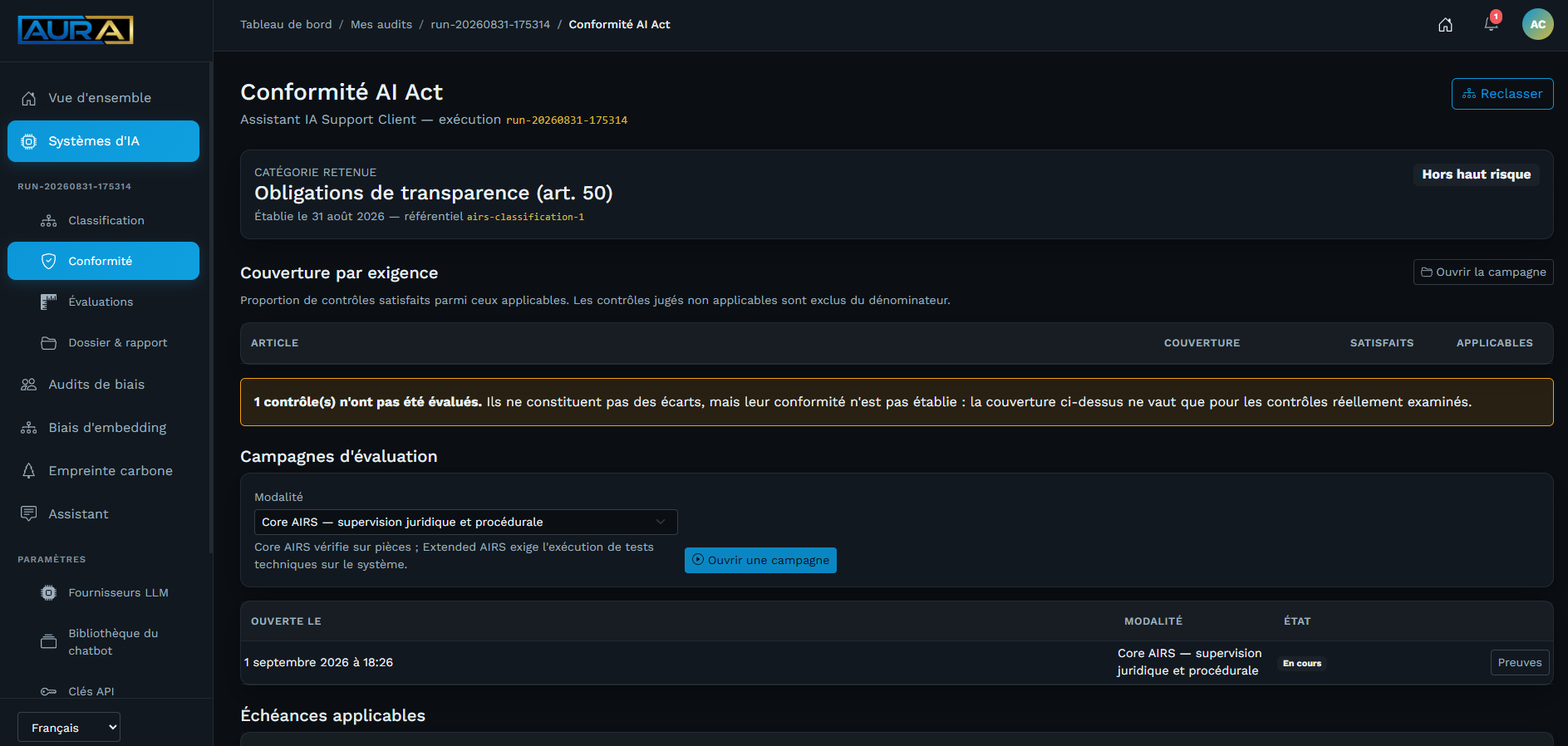
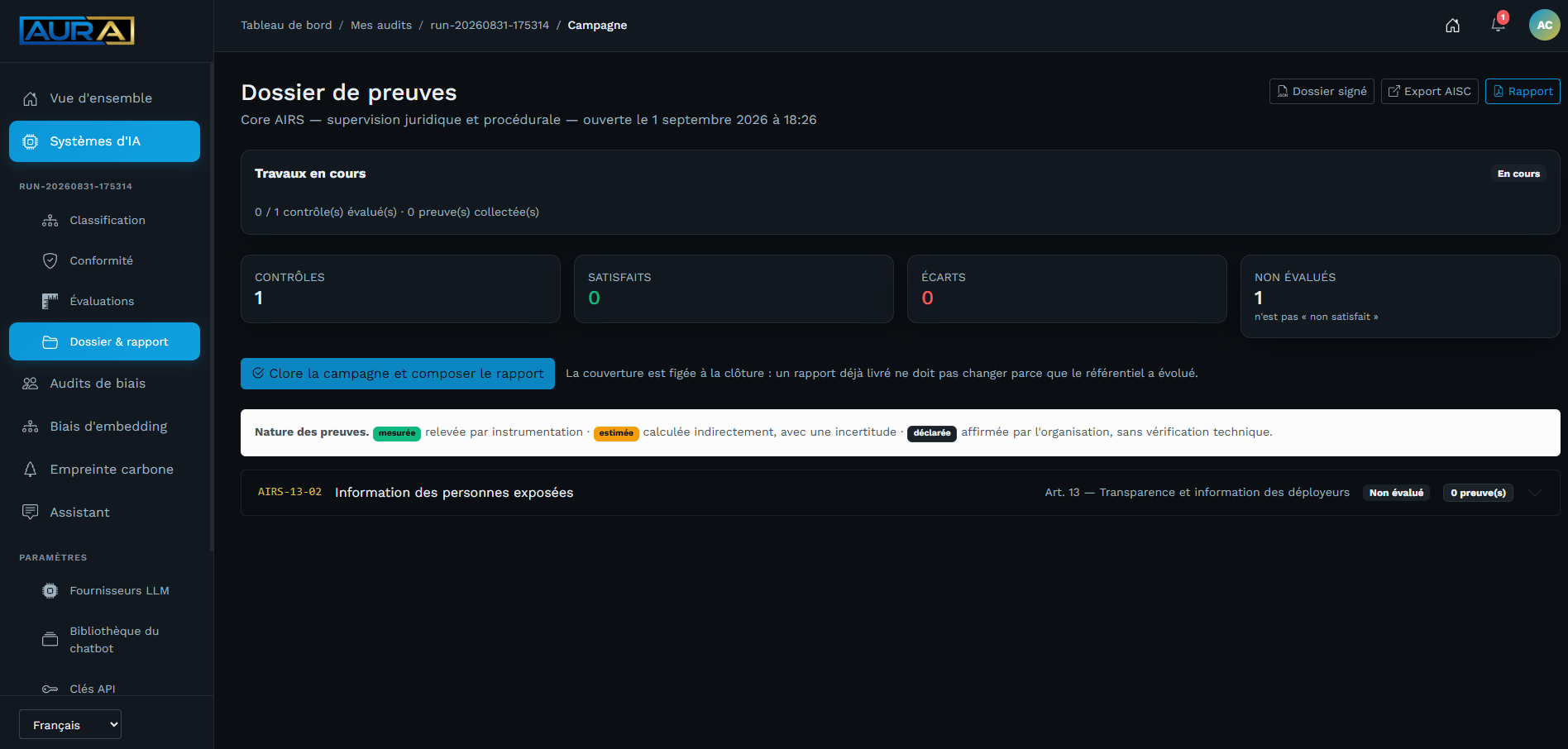
Each control shows the expected verification method and the evidence being sought. A control without evidence stays not assessed — it is never counted as a gap, and it stays visible rather than being hidden, so as not to suggest it wasn't applicable.
Applicable deadlines. The Compliance tab also lists the obligations that apply to your category, with their date. A deadline marked provisional stems from a political agreement not yet published in the Official Journal of the European Union: it can still change, and shouldn't be taken for granted.
6. The report and the file
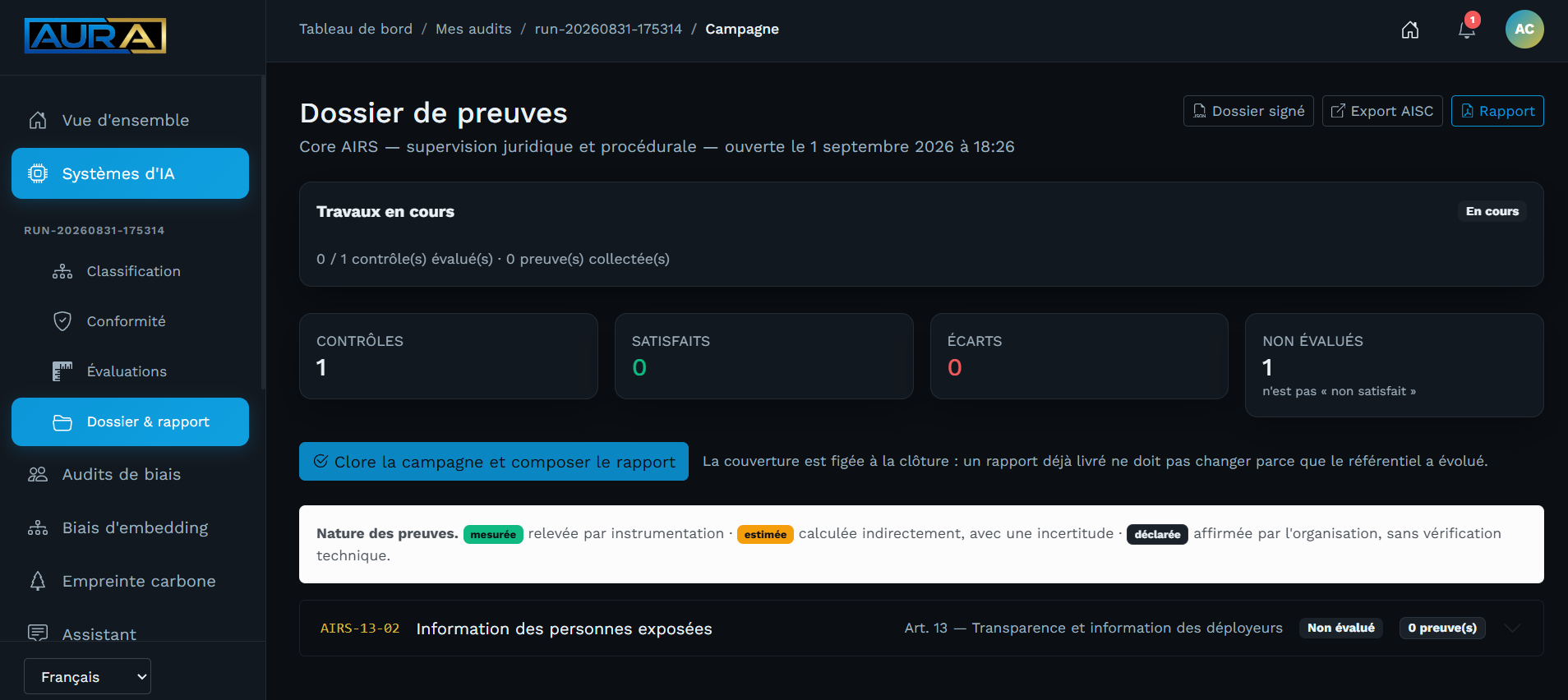
From an open campaign, Close the campaign and compose the report locks in the coverage — a report already delivered shouldn't change because the framework has evolved since. Three outputs, in the campaign's header:
| Report (PDF) | what you present. Classification, deadlines, coverage by requirement, gaps, remediation plan |
| AISC export | the evidence file in the AISC catalogue's format, to stay interoperable with a third-party tool |
| Signed file | what you hand to an auditor. It carries its own fingerprint, and can be verified without access to your account |
The report can carry an opening summary. You write it yourself, or ask a language model for a first draft — but it only enters the document after your review and approval, which appear in it with your name and the date. A draft never goes to an auditor in your name.
Switching to your own key
The trial is served by CEVIA's key. Beyond that, you configure your own: calls are then billed by your provider, with no time limit.
Settings → LLM Providers. Five uses are configured independently.
| Use | What it does |
|---|---|
| AI Act Chatbot | the model that drafts the assistant's answers, from your library |
| Vectorisation | the model that indexes this library so it can be searched |
| Model to audit (bias) | your generative model, the one you're submitting to the HELM/BBQ audit |
| Embedding model to audit (bias) | your embedding model, the one you're submitting to the WEAT/SEAT audit |
| Summary drafting | the model that proposes a first draft, which you review |
Three things are worth knowing before you start.
"Model to audit" means yours, not the best on the market — in both cases. Putting a well-regarded model there would mean auditing that model instead, and coming away with an accurate report that says nothing about your system. The two "under audit" uses are independent: configuring one doesn't configure the other, just as changing the vectorisation model doesn't change the model that drafts the assistant's answers.
Changing the vectorisation model requires reindexing. Two models don't place text in the same location; mixing them gives silently wrong answers. The platform reminds you of this at every indexing.
The "Test" button makes a real call. Validating only the shape of a key would prove nothing — it's the provider who decides whether it accepts it.
What happens to your key
It's encrypted before being saved, and is never shown again — not on screen, not in a log, not in an error message. The list shows seven characters out of thirty-two, enough to recognise which one is in place. To change it, you enter a new one; the old one is never read back.
Each use carries a monthly token cap. A call that would exceed it is refused before being made: that's what turns an unintended loop into a polite refusal rather than a bill.
Settings → LLM Providers → Consumption detail shows what's been consumed, by use, with the estimated cost and estimated emissions. The cost comes from the provider's public price list; their invoice prevails.
Auditing a self-hosted model
A model running on your own server — fine-tuned, with its own retrieval pipeline, whatever the machinery behind it — is audited the same way as any other: AURA treats it as a black box. It asks the test questions, it reads the answers, and it never sees what happens behind it.
Choose Self-hosted (vLLM, Ollama) as the provider for the "Model under audit" use. A self-hosted embedding model is configured the same way, under the "Embedding model to audit (bias)" use.
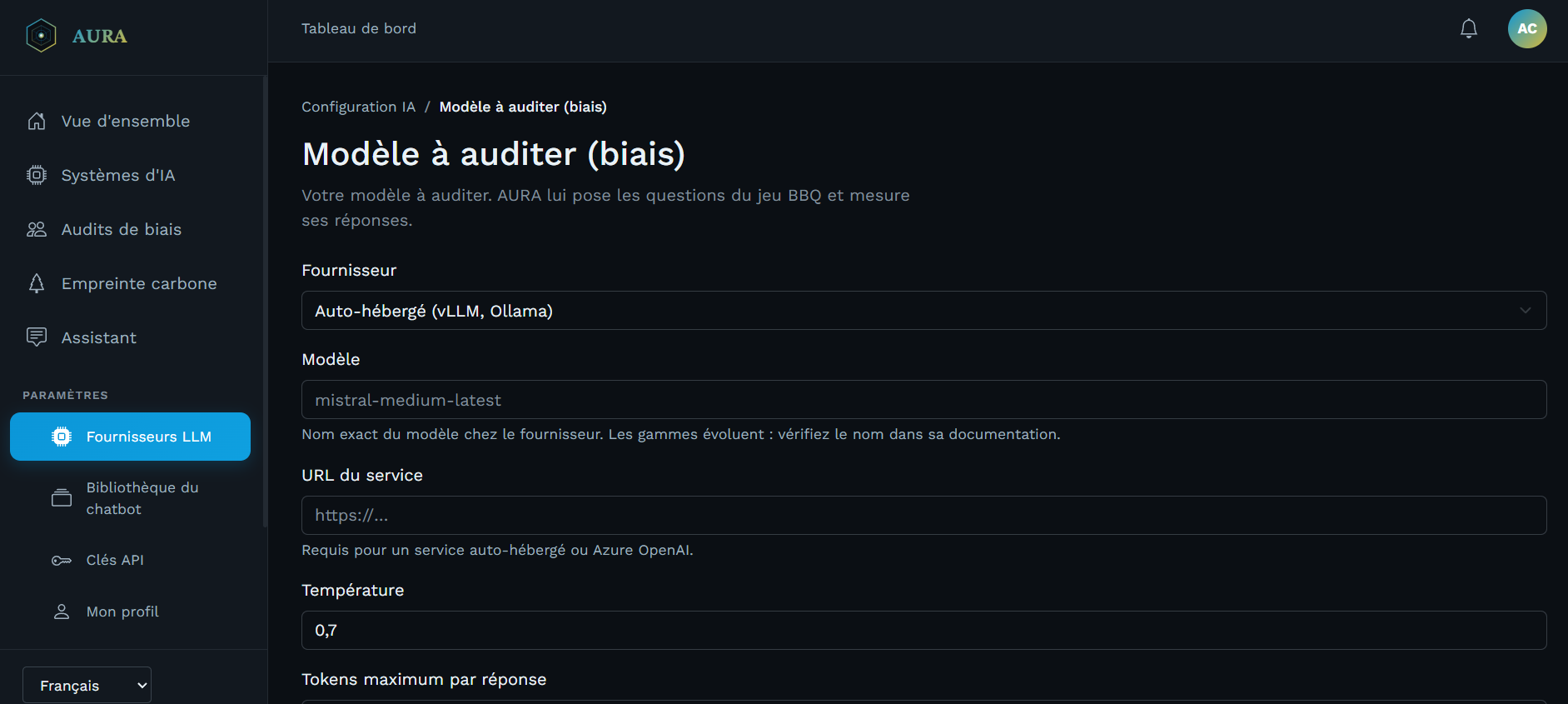
Two fields you fill in yourself, since there's no one to ask them from:
- Service URL — your server's address, over HTTPS, without exception. Over plain HTTP, the key travels in the clear on every call, on a network that isn't always your own.
- API key — a secret you invent yourself and set on both ends: on your
server (with vLLM, for instance, the
--api-keyflag at launch), and here, identically.
The "Test" button confirms both ends can talk to each other before you run the first audit.
The auraagent agent
Some measurements can't be taken from the platform: you need to be where your model runs. That's the agent's role, a command-line program you install on your own machine, under Linux, macOS or Windows.
Before you install
- Python 3.10, 3.11, 3.12 or 3.13 is required. Check with
python --version(on Windows:py --version).- Under Python 3.14 or 3.9,
pipsilently installs an old version of the agent that does not work. In that case, install Python 3.12 and create an environment dedicated to the agent (commands below).- The agent must be version 1.1 or later. Install it with
pip install --upgrade "auraagent>=1.1", then check withaura --version.- If an
AURA_SERVER_URLvariable exists on your machine, remove it beforeaura init. It overrides the server address.
If your Python is suitable:
pip install --upgrade "auraagent>=1.1"
aura --version
aura init
Otherwise, install Python 3.12 (Windows: winget install Python.Python.3.12;
macOS: brew install python@3.12; Ubuntu or Debian:
sudo apt install python3.12 python3.12-venv), then create the agent's
environment. On Windows, in PowerShell:
py -3.12 -m venv $HOME\aura-env
& $HOME\aura-env\Scripts\Activate.ps1
pip install --upgrade "auraagent>=1.1"
aura init
On macOS or Linux:
python3.12 -m venv ~/aura-env
source ~/aura-env/bin/activate
pip install --upgrade "auraagent>=1.1"
aura init
Activate this environment again before each use of aura. On Windows, if
activation is refused ("running scripts is disabled"), run
Set-ExecutionPolicy -Scope CurrentUser RemoteSigned once.
aura init asks for your account's API key — Settings → API Keys — and
writes it to ~/.aura.config, readable only by its owner.
Checking the installation
Right after aura init, run:
aura status
The expected output looks like this, with your own identifiers. The key stays masked:
                      Configuration Aura
┌──────────────────────┬──────────────────────────────────────┐
│ api_endpoint         │ https://aura.cevia.ai/               │
│ api_key              │ ●●●●●●●●                             │
│ default_project      │ Aura Default Project                 │
│ default_project_id   │ 3f2b8c1e-7a4d-4e9b-9c21-5d8e6f0a1b2c │
│ default_execution_id │ 9a7c5e3b-1d2f-4a6b-8c0e-2f4d6b8a0c1e │
└──────────────────────┴──────────────────────────────────────┘
api_endpoint must be https://aura.cevia.ai, with or without a trailing
slash. If it shows another address, run aura init again and answer y to "Voulez-vous le mettre à jour ?" (the
agent asks in French whether to update the configuration). If an error message
appears, see Agent troubleshooting.
Measuring bias
Your model never leaves your infrastructure. That's the default mode, and that's the point: the agent fetches the questions, asks your model locally, and only sends back the raw answers.
aura audit bias \
  --model my-model-v2 \
  --command "python query.py {question}"
The evaluation relies on the BBQ dataset and on HELM's metrics: bias in ambiguous context, in disambiguated context, accuracy.
A bias score ranges from −1 to +1, and zero is the good result:
| Value | Reading |
|---|---|
0 |
no leaning detected |
> 0 |
answers aligned with the stereotype |
< 0 |
leaning against the stereotype |
| absent | not measurable — not "zero" |
There is no threshold beyond which a model would be "compliant". The Regulation sets none, neither does HELM. The measurement documents; it doesn't decide.
Measuring the bias of an embedding model (WEAT/SEAT)
An embedding model — search engine, CV matching, internal RAG — doesn't answer questions: it turns words into vectors. The corresponding test is called WEAT/SEAT: it measures whether the vector space associates certain words more strongly with one group than another, rather than judging answers.
From the platform, nothing to install. This is the simplest path, and the default mode for this axis — unlike the generative bias audit above, where local is the default:
Embedding bias → New audit. Enter the model's identifier and launch the audit: AURA vectorizes your words via the provider configured for the "Embedding model to audit (bias)" use, and computes the result as a background task.
Locally, via the agent — the model never leaves your infrastructure:
aura audit bias-embedding \
  --model my-embedding-model-v2 \
  --command "python vectorize.py {text}" \
  --local
Your command receives a word and writes its vector to standard output, as
JSON: [0.12, -0.4, 0.07, ...]. A word whose vectorization fails is omitted
rather than skewing the calculation with a made-up vector.
The result carries an effect size (Cohen's d) and a p-value, per category tested:
| Value | Reading |
|---|---|
d ≈ 0 |
no association detected |
d > 0 |
the first group's words are closer to the attribute tested |
d < 0 |
the second group's words are closer to the attribute tested |
| absent | not computable — not "zero" |
What this measurement does not establish. An association in the vector space is not proven discrimination in the decisions your system produces downstream. It is evidence of examination under Article 10 §2(f)-(g) of the Regulation — it documents, it doesn't decide, exactly like the generative audit above.
Measuring the carbon footprint
aura audit carbon -- python train.py --epochs 10
The values reported are those CodeCarbon measured on your machine. An unavailable metric stays empty rather than being replaced with zero — zero would mean "no emissions".
The measured command's exit code is passed through: a continuous integration script fails if what it measures failed.
As a library, if you'd rather instrument your own code:
from aura import AuraCarbon

with AuraCarbon(execution_id="run-2026-001") as tracker:
    train_the_model()

print(tracker.metrics())
Retrieving the report
aura report 3f2504e0-4f89-11d3-9a0c-0305e82c3301
Three outcomes: 0 the report is saved, 1 the run can't be found, 2 the
report isn't composed yet — just wait a little.
What stays with you, and what goes to AURA
| Stays with you | Goes to AURA |
|---|---|
| The model, its weights, its code | the raw answers to the BBQ dataset's questions |
| Your training data | the metrics CodeCarbon measured |
| The command you run | the run's identifier |
| The embedding model, in local mode | the WEAT/SEAT test words' vectors |
Your API key never appears — not on screen, not in a log, not in an error
message. The ~/.aura.config file is created with mode 0600.
Protecting your account
Settings → My profile → Security. Two-factor authentication is optional, and set per person.
Once enabled, your password is no longer enough: a code from your authenticator app is requested at every login. You receive ten backup codes, shown once — write them down. They're for when you don't have your phone, and each one works only once.
It only concerns the browser. auraagent and the API keep authenticating by
key: a machine doesn't type a six-digit code.
When something goes wrong
The chatbot answers "the extracts provided don't allow an answer". This isn't a failure. It searched its library, found nothing relevant, and says so rather than inventing one. The text you're looking for may not be indexed yet.
A control stays "not assessed". No evidence has been attached to it. This isn't a failure, and the report doesn't count it as one.
The report isn't available yet. It's being composed in the background. The screen says so rather than handing you an incomplete document.
A call is refused even though your key is valid. Check the monthly cap for the use in question, on the providers screen.
Agent troubleshooting
Always start with these three checks:
python --version
aura --version
aura status
aura status masks your key: you can send its output to support as is.
The agent shows "ERR_NGROK_6008". Your configuration still points to the
former development server, which has been shut down. If an AURA_SERVER_URL
variable exists, remove it, then run aura init again and answer y to
"Voulez-vous le mettre à jour ?". On Windows, in PowerShell:
[Environment]::SetEnvironmentVariable("AURA_SERVER_URL", $null, "User")
Remove-Item Env:AURA_SERVER_URL -ErrorAction SilentlyContinue
aura init
On macOS or Linux, also remove any export AURA_SERVER_URL=… line from
~/.bashrc or ~/.zshrc:
unset AURA_SERVER_URL
aura init
pip refuses to install auraagent>=1.1. It shows:
ERROR: Ignored the following versions that require a different python version: 1.0.0 Requires-Python >=3.10,<3.14; 1.1.0 Requires-Python >=3.10,<3.14
ERROR: Could not find a version that satisfies the requirement auraagent>=1.1 (from versions: 0.1.0, …, 0.3)
ERROR: No matching distribution found for auraagent>=1.1
Your Python version is not supported — most often 3.14 or 3.9. Install
Python 3.12 and create the dedicated environment described in
The auraagent agent.
The agent gets a 404 error on a //api/… address. Agents 1.0.0 and 1.1.0
added an extra slash to the server address. The platform has accepted these
addresses since 23 October 2026: first, simply run the command again. If the
error persists, update the agent.
pip install --upgrade "auraagent>=1.1"
aura --version shows 0.x. An old version of the agent is installed,
almost always because your Python is 3.14 or 3.9: pip then silently picks the
latest compatible version, which points to the shut-down server. Install
Python 3.12, create the dedicated environment described in
The auraagent agent, then remove the old
configuration before aura init — on Windows,
Remove-Item $HOME\.aura.config, on macOS or Linux, rm -f ~/.aura.config.